- Releases
- Syslog Message Severities
- User \& Permission
- add user to group
- rename
- password
- sudoers
- chown
- Package Management
- Ubuntu
- Debian
- dpkg
- apt
- ssh server
- Serial
- client
- Benchmark
- mosh
- sshd
- ssh redirect
- font
- SELinux
- I18N \& I10N
- cache diagnostics
- WOL
- CPU
- check_cpu_core_mapping
- USB Persistence
- kali
- ssh
- tools
- Video
- OpenCL
- zFCP
- Diagram
- diskless
Releases
Syslog Message Severities
https://tools.ietf.org/html/rfc5424#section-6.2.1
0       Emergency: system is unusable
1       Alert: action must be taken immediately
2       Critical: critical conditions
3       Error: error conditions
4       Warning: warning conditions
5       Notice: normal but significant condition
6       Informational: informational messages
7       Debug: debug-level messages
User & Permission
add user to group
sudo adduser foobar www-data
sudo usermod -a -G ftp tony
rename
pkill -9 -u ubuntu
usermod --login fzinfz --move-home --home /home/fzinfz ubuntu
sed -i 's/ubuntu/fzinfz/' /etc/sudoers
password
echo user:pwd | chpasswd
sudoers
sudo visudo
    root    ALL=(ALL) ALL # {terminals}=({users}) {commands}
    %supergroup  ALL=(ALL) NOPASSWD:ALL
chown
chown -h myuser:mygroup mysymbolic
Package Management
Ubuntu
Main - Canonical-supported free and open-source software.
Universe - Community-maintained free and open-source software.
Restricted - Proprietary drivers for devices.
Multiverse - Software restricted by copyright or legal issues.
# https://mirror.tuna.tsinghua.edu.cn/help/ubuntu/
deb https://mirrors.tuna.tsinghua.edu.cn/ubuntu/ xenial main restricted universe multiverse
Debian
→ experimental
→ unstable(Sid) → testing → stable
Unstable - repository where new & untested packages are introduced.
Testing - repository with packages from unstable, if no bug are found within 10 days.
main consists of DFSG-compliant packages, which do not rely on software outside this area to operate. These are the only packages considered part of the Debian distribution.
contrib packages contain DFSG-compliant software, but have dependencies not in main (possibly packaged for Debian in non-free).
non-free contains software that does not comply with the DFSG.
deb http://mirror.sjtu.edu.cn/debian/ bullseye main contrib non-free
dpkg
dpkg --get-selections # list installed
To install .deb manually, visit linux/kernel page.
apt
apt-get install linux-base -t jessie-backports
apt-cache search linux-image | grep linux-image-4
apt install linux-image-4.10.0-9-generic linux-image-extra-4.10.0-9-generic

apt show linux-image-extra-4.10*

apt-get install --only-upgrade docker-engine

apt policy docker-ce | head -n 20

apt-get autoclean
apt list --installed

rm -r /var/lib/apt/lists/*
echo 'Acquire::http::Proxy "http://192.168.88.25:7890"; ' > /etc/apt/apt.conf.d/proxy
ssh server
deb http://.../debian/ buster main contrib non-free

apt install openssh-server # not "openssl"

journalctl -u ssh # fix: ssh-rsa not in PubkeyAcceptedAlgorithms
PubkeyAcceptedAlgorithms  +ssh-rsa
Serial
https://help.ubuntu.com/community/SerialConsoleHowto
GRUB_CMDLINE_LINUX="console=tty0 console=ttyS0,115200n8"
client
screen /dev/ttyUSB0 115200
picocom -b 115200 /dev/ttyUSB0
Benchmark
http://www.brendangregg.com/Perf/linux_benchmarking_tools.png
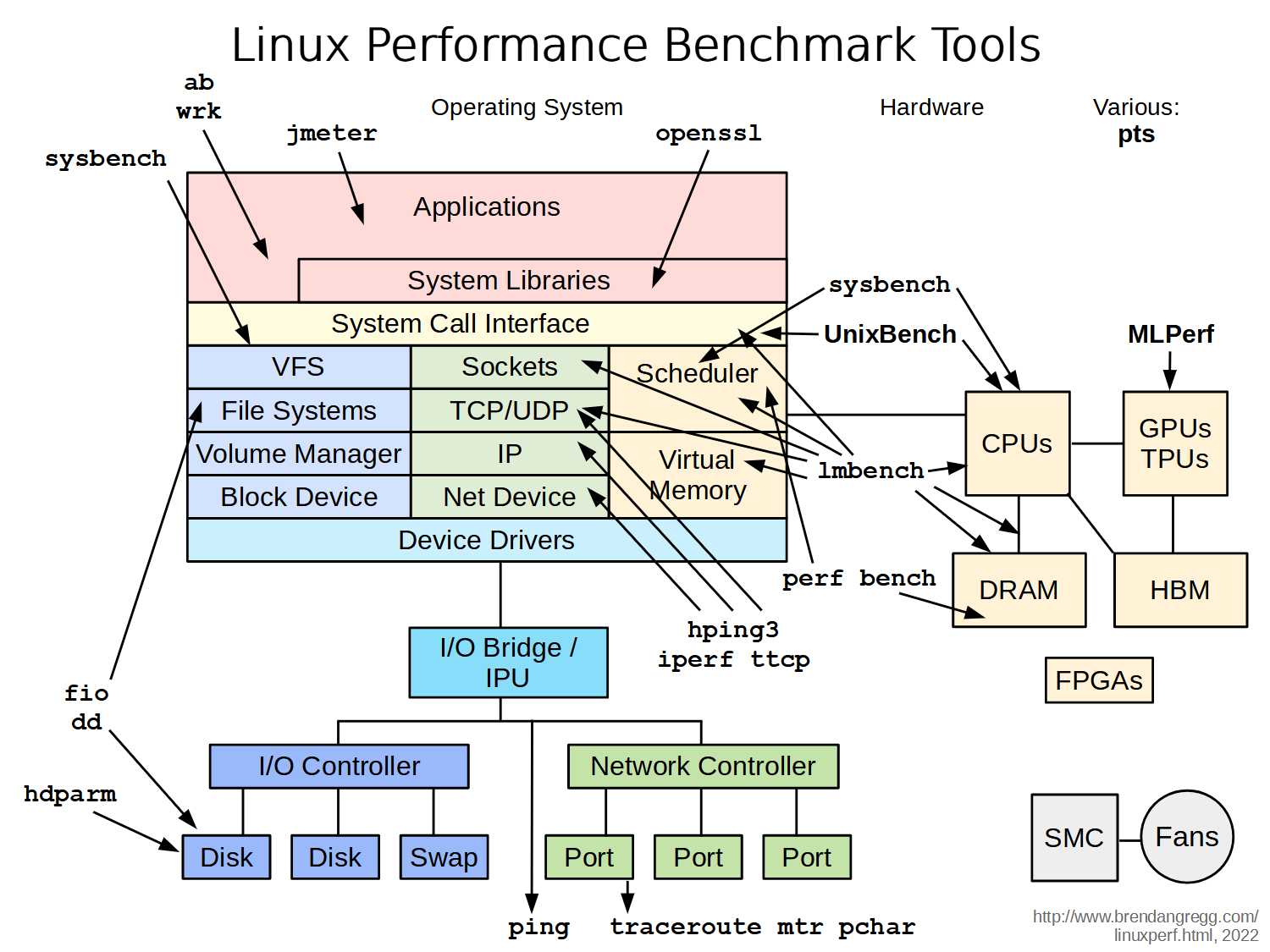
    sysbench --test=cpu --cpu-max-prime=20000 --num-threads=32 run

    wget http://www.numberworld.org/y-cruncher/y-cruncher%20v0.7.9.9510-static.tar.xz
    tar -xf y-cruncher*.tar.xz
mosh
apt install mosh -y
ss -lntup | grep mosh # 60000:61000/udp | **after** client connected
sshd
mobaxterm login failed: No supported authentication methods
PubkeyAcceptedAlgorithms +ssh-rsa # sshd_config # journalctl -u ssh
ssh redirect
ssh -L 9000:public.com:80   # visit local:9000 -> public.com:80
ssh -L 0.0.0.0:54321:127.0.0.1:54321 remote -p 22
ssh -R 9000:localhost:3000  # visit remote:9000 -> local:3000, "GatewayPorts yes" in sshd_config
    -nNT -L ...   # port forwarding only, no shell
font
apt-get install xfonts-base
SELinux
getenforce
semanage port -a -t mongod_port_t -p tcp 27017
I18N & I10N
apt install -y locales-all
locale -a
dpkg-reconfigure locales

yum grouplist chinese-support

sudo apt-get install -y ttf-wqy-microhei  #文泉驿-微米黑
sudo apt-get install -y ttf-wqy-zenhei  #文泉驿-正黑
sudo apt-get install -y xfonts-wqy #文泉驿-点阵宋体
cache diagnostics
git clone https://github.com/hoytech/vmtouch.git
cd vmtouch && make && sudo make install

Discovering which files your OS is caching
Telling the OS to cache or evict certain files or regions of files
Locking files into memory so the OS won't evict them
Preserving virtual memory profile when failing over servers
Keeping a "hot-standby" file-server
Plotting filesystem cache usage over time
Maintaining "soft quotas" of cache usage
Speeding up batch/cron jobs
WOL
ethtool enp1s0  | grep Wake-on

p (PHY activity)
u (unicast activity)
m (multicast activity)
b (broadcast activity)
g (magic packet activity) *
a (ARP activity)
d (disabled)
CPU
getconf LONG_BIT
check_cpu_core_mapping
https://www.ibm.com/support/knowledgecenter/en/SSQPD3_2.6.0/com.ibm.wllm.doc/mappingcpustocore.html
same physical/core ID =》 simultaneous multi threads (SMTs) / HT
cat /proc/cpuinfo  | grep -P 'processor|physical id|core id|^$'

pip install walnut    # pretty print
for c in sorted([ ( int(c['processor']), int(c['physical id']), int(c['core id']) ) for c in cpu.dict().values()]): print c
USB Persistence
https://docs.kali.org/downloading/kali-linux-live-usb-persistence
http://antix.mepis.org/index.php?title=Using_liveusb_with_persistence
kali
x86/M1/Live/VM/WSL/etc: https://www.kali.org/get-kali
Docker: https://hub.docker.com/u/kalilinux/
ssh
Since 2022.1: https://www.kali.org/docs/general-use/ssh-configuration/ - kali-tweaks -> Hardening -> Strong Security (the default) and Wide Compatibility
ls -l /etc/ssh/ssh_host_*
systemctl disable regenerate-ssh-host-keys.service
tools
https://www.kali.org/tools/
screenshots/cheat sheet: https://www.comparitech.com/net-admin/kali-linux-cheat-sheet/#Kali_Linux_tools
Video
dpkg -l amdgpu-pro
glxinfo | grep direct
GALLIUM_HUD=help glxgears
OpenCL
installable client driver loader (ICD Loader) may expose multiple separate vendor installable client drivers (Vendor ICDs) for OpenCL.
sudo apt install ocl-icd-opencl-dev
zFCP
device driver that supplements the Linux SCSI stack.

Diagram

diskless
https://help.ubuntu.com/community/DisklessUbuntuHowto
docker run --network=host -d leejoneshane/drbl-server
http://web.mst.edu/~vojtat/pegasus/administration.htm
based on Scientific Linux 7 / CentOS 7 / Red Hat Enterprise Linux 7